Leaflet Plugin For Creating And Editing Geometry Layers
Draw, Edit, Drag, Cut, Rotate, Split⭐, Scale⭐, Measure⭐, Snap and Pin⭐ Layers
Supports Markers, CircleMarkers, Polylines, Polygons, Circles, Rectangles, ImageOverlays, LayerGroups, GeoJSON, MultiLineStrings and MultiPolygons
## [👉 Live Demo 👈](https://geoman.io/leaflet-geoman)

### Using Leaflet-Geoman in production?
[Please consider sponsoring its development](https://github.com/sponsors/codeofsumit)
#### Leaflet-Geoman Pro ⭐
Features marked with ⭐ in this documentation are available in Leaflet-Geoman Pro. [Purchase Pro](https://geoman.io/leaflet-geoman-pro#pricing) or [get in touch](mailto:sumit@geoman.io)
## Documentation
- [Installation](#installation)
- [Getting Started](#getting-started)
- [Draw Mode](#draw-mode)
- [Edit Mode](#edit-mode)
- [Drag Mode](#drag-mode)
- [Removal Mode](#removal-mode)
- [Cut Mode](#cut-mode)
- [Rotation Mode](#rotation-mode)
- [Split Mode ⭐](#split-mode-)
- [Scale Mode ⭐](#scale-mode-)
- [Text Layer](#text-layer)
- [Options](#options)
- [Snapping](#snapping)
- [Pinning ⭐](#pinning-)
- [Measurement ⭐](#measurement-)
- [AutoTracing ⭐](#autotracing-)
- [LayerGroup](#layergroup)
- [Customization](#customize)
- [Toolbar](#toolbar)
- [Utils](#utils)
- [Lazy loading](#lazy-loading)
- [Need a feature? | Existing Feature Requests](https://github.com/geoman-io/Leaflet-Geoman/issues?q=is%3Aissue+is%3Aclosed+label%3A%22feature+request%22+sort%3Areactions-%2B1-desc)
### Installation
#### Migrate from Leaflet.PM
```
npm uninstall leaflet.pm
npm i @geoman-io/leaflet-geoman-free
```
That's it.
#### Install via npm
```
npm i @geoman-io/leaflet-geoman-free
```
#### Install Manually
Download
[`leaflet-geoman.css`](https://unpkg.com/@geoman-io/leaflet-geoman-free@latest/dist/leaflet-geoman.css) and
[`leaflet-geoman.min.js`](https://unpkg.com/@geoman-io/leaflet-geoman-free@latest/dist/leaflet-geoman.min.js)
and include them in your project.
#### Include via CDN
CSS
```html
```
JS
```html
```
#### Include as ES6 Module
```js
import '@geoman-io/leaflet-geoman-free';
import '@geoman-io/leaflet-geoman-free/dist/leaflet-geoman.css';
```
### Getting Started
#### Init Leaflet-Geoman
Just include `leaflet-geoman.min.js` right after Leaflet. It initializes itself. If
you want certain layers to be ignored by Leaflet-Geoman, pass `pmIgnore: true` to
their options when creating them. Example:
```js
L.marker([51.50915, -0.096112], { pmIgnore: true }).addTo(map);
```
Enable Leaflet-Geoman on an ignored layer:
```js
layer.options.pmIgnore = false;
L.PM.reInitLayer(layer);
```
If `Opt-In` (look below) is `true`, a layers `pmIgnore` property has to be set to `false` to get initiated.
#### Opt-In
If you want to use Leaflet-Geoman as opt-in, call the following function right after importing:
```js
L.PM.setOptIn(true);
```
And to disable it:
```js
L.PM.setOptIn(false);
```
If you have enabled opt-in before you init the map, you need to specify `pmIgnore: false` in the map options:
```js
const map = L.map('map', { pmIgnore: false });
```
All layers will be ignored by Leaflet-Geoman, unless you specify `pmIgnore: false` on a layer:
```js
L.marker([51.50915, -0.096112], { pmIgnore: false }).addTo(map);
```
Newly drawn layers will be ignored as well.
To prevent this you can add the following event handler:
```js
map.on('pm:create', (e) => {
e.layer.options.pmIgnore = false;
L.PM.reInitLayer(e.layer);
});
```
#### Leaflet-Geoman Toolbar
You can add a toolbar to the map to use Leaflet-Geoman features via a user interface.
```js
// add Leaflet-Geoman controls with some options to the map
map.pm.addControls({
position: 'topleft',
drawCircle: false,
});
```
The following methods are available on `map.pm`:
| Method | Returns | Description |
| :---------------------------- | :-------- | :------------------------------------------------------------------------------------------------------------ |
| addControls(`options`) | - | Adds the Toolbar to the map. The `options` are optional. Buttons can be removed with setting them to `false`. |
| removeControls() | - | Removes the Toolbar from the map. |
| toggleControls() | - | Toggle the visiblity of the Toolbar. |
| controlsVisible() | `Boolean` | Returns `true` if the Toolbar is visible on the map. |
See the available options in the table below.
| Option | Default | Description |
| :----------------- | :---------- | :----------------------------------------------------------------------------------------------- |
| position | `'topleft'` | Toolbar position, possible values are `'topleft'`, `'topright'`, `'bottomleft'`, `'bottomright'` |
| positions | `Object` | The position of each block (`draw`, `edit`, `custom`, `options`⭐) can be customized. If not set, the value from `position` is taken. Default: `{draw: '', edit: '', options: '', custom: ''}` [Block Position](#toolbar-block-position) |
| drawMarker | `true` | Adds button to draw Markers. |
| drawCircleMarker | `true` | Adds button to draw CircleMarkers. |
| drawPolyline | `true` | Adds button to draw Line. |
| drawRectangle | `true` | Adds button to draw Rectangle. |
| drawPolygon | `true` | Adds button to draw Polygon. |
| drawCircle | `true` | Adds button to draw Circle. |
| drawText | `true` | Adds button to draw Text. |
| editMode | `true` | Adds button to toggle Edit Mode for all layers. |
| dragMode | `true` | Adds button to toggle Drag Mode for all layers. |
| cutPolygon | `true` | Adds button to cut a hole in a Polygon or Line. |
| removalMode | `true` | Adds a button to remove layers. |
| rotateMode | `true` | Adds a button to rotate layers. |
| oneBlock | `false` | All buttons will be displayed as one block [Customize Controls](#customize-controls). |
| drawControls | `true` | Shows all draw buttons / buttons in the `draw` block. |
| editControls | `true` | Shows all edit buttons / buttons in the `edit` block. |
| customControls | `true` | Shows all buttons in the `custom` block. |
| optionsControls | `true` | Shows all options buttons / buttons in the `option` block ⭐. |
| pinningOption | `true` | Adds a button to toggle the Pinning Option ⭐. |
| snappingOption | `true` | Adds a button to toggle the Snapping Option ⭐. |
| splitMode | `true` | Adds a button to toggle the Split Mode for all layers ⭐. |
| scaleMode | `true` | Adds a button to toggle the Scale Mode for all layers ⭐. |
| autoTracingOption | `false` | Adds a button to toggle the Auto Tracing Option ⭐. |
To pass options to the buttons you have two ways:
```js
// make polygon not snappable during draw
map.pm.enableDraw('Polygon',{ snappable: false });
map.pm.disableDraw();
```
```js
// make all layers not snappable during draw
map.pm.setGlobalOptions({ snappable: false });
```
The options will persist, even when the mode is enabled/disabled via the toolbar.
All available options for drawing and editing are specified in the sections below.
### Draw Mode
Use Draw Mode on a map like this:
```js
// enable polygon Draw Mode
map.pm.enableDraw('Polygon', {
snappable: true,
snapDistance: 20,
});
// disable Draw Mode
map.pm.disableDraw();
```
Currently available shapes are `Marker`, `CircleMarker`, `Circle`, `Line`, `Rectangle`, `Polygon`, `Text`, `Cut`, `CutCircle`⭐ and `Split`⭐.
The following methods are available on `map.pm`:
| Method | Returns | Description |
| :------------------------------------------- | :-------- | :----------------------------------------------------------------------------------------------------------------------------------------------------------------------------------------------------------------------- |
| enableDraw(`shape`,`options`) | - | Enable Draw Mode with the passed shape. The `options` are optional. |
| disableDraw() | - | Disable Draw Mode. |
| Draw.getShapes() | `Array` | Array of available shapes. |
| Draw.getActiveShape() | `String` | Returns the active shape. |
| globalDrawModeEnabled() | `Boolean` | Returns `true` if global Draw Mode is enabled. `false` when disabled. |
| setPathOptions(`options`, `optionsModifier`) | - | Customize the style of the drawn layer. Only for L.Path layers. Shapes can be excluded with a `ignoreShapes` array or merged with the current style with `merge: true` in `optionsModifier` [Details](#customize-style). |
| setGlobalOptions(`options`) | - | Set `globalOptions` and apply them. |
| applyGlobalOptions() | - | Apply the current `globalOptions` to all existing layers. |
| getGlobalOptions() | `Object` | Returns the `globalOptions`. |
| getGeomanLayers(`Boolean`) | `Array` | Returns all Leaflet-Geoman layers on the map as array. Pass `true` to get a L.FeatureGroup. |
| getGeomanDrawLayers(`Boolean`) | `Array` | Returns all drawn Leaflet-Geoman layers on the map as array. Pass `true` to get a L.FeatureGroup. |
| Draw..setOptions(`options`) | - | Applies the options to the drawing shape and calls `setStyle`. `map.pm.Draw.Line.setOptions(options)`. |
| Draw..setStyle(`options`) | - | Applies the styles (`templineStyle`, `hintlineStyle`, `pathOptions`, `markerStyle`) to the drawing layer. `map.pm.Draw.Line.setStlye(options)`. |
See the available options in the table below.
| Option | Default | Description |
| :-------------------- | :---------------------------------------- | :-------------------------------------------------------------------------------------------------------------------------------------------------------------------------------------------------------- |
| snappable | `true` | Enable snapping to other layers vertices for precision drawing. Can be disabled by holding the `ALT` key. |
| snapDistance | `20` | The distance to another vertex when a snap should happen. |
| snapMiddle | `false` | Allow snapping in the middle of two vertices (middleMarker). |
| snapSegment | `true` | Allow snapping between two vertices. |
| requireSnapToFinish | `false` | Require the last point of a shape to be snapped. |
| tooltips | `true` | Show helpful tooltips for your user. |
| allowSelfIntersection | `true` | Allow self intersections. |
| templineStyle | `{ color: '#3388ff' },` | [Leaflet path options](https://leafletjs.com/reference.html#path) for the lines between drawn vertices/markers. |
| hintlineStyle | `{ color: '#3388ff', dashArray: [5, 5] }` | [Leaflet path options](https://leafletjs.com/reference.html#path) for the helper line between last drawn vertex and the cursor. |
| pathOptions | `null` | [Leaflet path options](https://leafletjs.com/reference.html#path) for the drawn layer (Only for L.Path layers). |
| markerStyle | `{ draggable: true }` | [Leaflet marker options](https://leafletjs.com/reference.html#marker-icon) (only for drawing markers). |
| cursorMarker | `true` | Show a marker at the cursor. |
| finishOn | `null` | Leaflet layer event to finish the drawn shape, like `'dblclick'`. [Here's a list](http://leafletjs.com/reference.html#interactive-layer-click). `snap` is also an option for Line, Polygon and Rectangle. |
| hideMiddleMarkers | `false` | Hide the middle Markers in Edit Mode from Polyline and Polygon. |
| minRadiusCircle | `null` | Set the min radius of a `Circle`. |
| maxRadiusCircle | `null` | Set the max radius of a `Circle`. |
| minRadiusCircleMarker | `null` | Set the min radius of a `CircleMarker` when editable is active. |
| maxRadiusCircleMarker | `null` | Set the max radius of a `CircleMarker` when editable is active. |
| editable | `false` | Makes a `CircleMarker` editable like a `Circle`. |
| markerEditable | `true` | Markers and CircleMarkers are editable during the draw-session (you can drag them around immediately after drawing them). |
| continueDrawing | `false` / `true` | Draw Mode stays enabled after finishing a layer to immediately draw the next layer. Defaults to `true` for Markers and CircleMarkers and `false` for all other layers. |
| rectangleAngle | `0` | Rectangle can drawn with a rotation angle 0-360 degrees |
| layersToCut | `[]` | Cut-Mode: Only the passed layers can be cut. Cutted layers are removed from the Array until no layers are left anymore and cutting is working on all layers again. |
| textOptions | `{}` | Text Layer options. Look into [textOptions](#text-layer-drawing). |
| closedPolygonEdge | `false` | Closes the Polygon while drawing ⭐. |
| closedPolygonFill | `false` | Shows the Polygon fill while drawing ⭐. |
| autoTracing | `false` | Enables auto tracing while drawing ⭐. |
| allowCircleCut | `true` | Allow Cutting of a Circle ⭐. |
This options can only set over `map.pm.setGlobalOptions({})`:
| Option | Default | Description |
| :--------- | :------ | :--------------------------------------------------------- |
| layerGroup | `map` | Add the created layers to a layergroup instead to the map. |
You can listen to map events to hook into the drawing procedure like this:
```js
map.on('pm:drawstart', (e) => {
console.log(e);
});
```
Here's a list of map events you can listen to:
| Event | Params | Description | Output |
| :----------------------- | :----- | :-------------------------------------------------------------------------------------- | :------------------------ |
| pm:globaldrawmodetoggled | `e` | Fired when Drawing Mode is toggled. | `enabled`, `shape`, `map` |
| pm:drawstart | `e` | Called when Draw Mode is enabled. Payload includes the shape type and working layer. | `shape`, `workingLayer` |
| pm:drawend | `e` | Called when Draw Mode is disabled. Payload includes the shape type. | `shape` |
| pm:create | `e` | Called when a shape is drawn/finished. Payload includes shape type and the drawn layer. | `shape`, `layer` |
There are also several events for layers during draw. Register an event like this:
```js
// listen to vertexes being added to currently drawn layer (called workingLayer)
map.on('pm:drawstart', ({ workingLayer }) => {
workingLayer.on('pm:vertexadded', (e) => {
console.log(e);
});
});
```
Here's a list of layer events you can listen to:
| Event | Params | Description | Output |
| :-------------- | :----- | :-------------------------------------------------------------------------------------------------------------------- | :------------------------------------------------------------------------------------------------------ |
| pm:vertexadded | `e` | Called when a new vertex is added. Payload includes the new vertex, it's marker, index, working layer and shape type. | `shape`, `workingLayer`, `marker`, `latlng` |
| pm:snapdrag | `e` | Fired during a marker move/drag. Payload includes info about involved layers and snapping calculation. | `shape`, `distance`, `layer` = `workingLayer`, `marker`, `layerInteractedWith`, `segment`, `snapLatLng` |
| pm:snap | `e` | Fired when a vertex is snapped. Payload is the same as in `snapdrag`. | `shape`, `distance`, `layer` = `workingLayer`, `marker`, `layerInteractedWith`, `segment`, `snapLatLng` |
| pm:unsnap | `e` | Fired when a vertex is unsnapped. Payload is the same as in `snapdrag`. | `shape`, `distance`, `layer` = `workingLayer`, `marker`, `layerInteractedWith`, `segment`, `snapLatLng` |
| pm:centerplaced | `e` | Called when the center of a circle is placed/moved. | `shape`, `workingLayer`, `latlng` |
| pm:change | `e` | Fired coordinates of the layer changed. | `layer`, `latlngs`, `shape` |
For making the snapping to other layers selective, you can add the "snapIgnore" option to your layers to disable the snapping to them during drawing.
```js
//This layer will be ignored by the snapping engine during drawing
L.geoJSON(data, {
snapIgnore: true,
});
```
### Edit Mode
You can enable Edit Mode for all layers on a map like this:
```js
// enable global Edit Mode
map.pm.enableGlobalEditMode(options);
```
The following methods are available on `map.pm`:
| Method | Returns | Description |
| :------------------------------ | :-------- | :-------------------------------------------------------------------- |
| enableGlobalEditMode(`options`) | - | Enables global Edit Mode. |
| disableGlobalEditMode() | - | Disables global Edit Mode. |
| toggleGlobalEditMode(`options`) | - | Toggles global Edit Mode. |
| globalEditModeEnabled() | `Boolean` | Returns `true` if global Edit Mode is enabled. `false` when disabled. |
Enable Edit Mode only for one layer:
```js
// enable Edit Mode
layer.pm.enable({
allowSelfIntersection: false,
});
```
The following methods are available for layers under `layer.pm`:
| Method | Returns | Description |
| :-------------------- | :-------- | :------------------------------------------------------------------------------------------------------------------------- |
| enable(`options`) | - | Enables Edit Mode. The passed options are preserved, even when the mode is enabled via the Toolbar. `options` is optional. |
| disable() | - | Disables Edit Mode. |
| toggleEdit(`options`) | - | Toggles Edit Mode. Passed options are preserved. `options` is optional. |
| enabled() | `Boolean` | Returns `true` if Edit Mode is enabled. `false` when disabled. |
| hasSelfIntersection() | `Boolean` | Returns `true` if `Line` or `Polygon` has a self intersection. |
| remove() | - | Removes the layer with the same checks as GlobalRemovalMode. |
| getShape() | `String` | Returns the shape of the layer. |
| setOptions(`options`) | - | Set the options on the layer. |
| getOptions() | `Object` | Returns the options of the layer. |
See the available options in the table below.
| Option | Default | Description |
| :----------------------------- | :------------ | :---------------------------------------------------------------------------------------------------------------------------------------------------------------------------------------------------------------------------- |
| snappable | `true` | Enable snapping to other layers vertices for precision drawing. Can be disabled by holding the `ALT` key. |
| snapDistance | `20` | The distance to another vertex when a snap should happen. |
| allowSelfIntersection | `true` | Allow/Disallow self-intersections on Polygons and Polylines. |
| allowSelfIntersectionEdit | `false` | Allow/Disallow to change vertices they are connected to a intersecting line. Only working if allowSelfIntersection is `true` and the layer is already self-intersecting while enabling Edit Mode. |
| preventMarkerRemoval | `false` | Disable the removal of markers/vertexes via right click. |
| removeLayerBelowMinVertexCount | `true` | If `true`, vertex removal that cause a layer to fall below their minimum required vertices will remove the entire layer. If `false`, these vertices can't be removed. Minimum vertices are 2 for Lines and 3 for Polygons. |
| syncLayersOnDrag | `false` | Defines which layers should dragged with this layer together. `true` syncs all layers in the same LayerGroup(s) or you pass an `Array` of layers to sync. |
| allowEditing | `true` | Edit-Mode for the layer can disabled (`pm.enable()`). |
| allowRemoval | `true` | Removing can be disabled for the layer. |
| allowCutting | `true` | Layer can be prevented from cutting. |
| allowRotation | `true` | Layer can be prevented from rotation. |
| draggable | `true` | Dragging can be disabled for the layer. |
| addVertexOn | `click` | Leaflet layer event to add a vertex to a Line or Polygon, like `'dblclick'`. [Here's a list](http://leafletjs.com/reference.html#interactive-layer-click). |
| addVertexValidation | `undefined` | A function for validation if a vertex (of a Line / Polygon) is allowed to add. It passes a object with `[layer, marker, event}`. For example to check if the layer has a certain property or if the `Ctrl` key is pressed. |
| removeVertexOn | `contextmenu` | Leaflet layer event to remove a vertex from a Line or Polygon, like `'dblclick'`. [Here's a list](http://leafletjs.com/reference.html#interactive-layer-click). |
| removeVertexValidation | `undefined` | A function for validation if a vertex (of a Line / Polygon) is allowed to remove. It passes a object with `[layer, marker, event}`. For example to check if the layer has a certain property or if the `Ctrl` key is pressed. |
| moveVertexValidation | `undefined` | A function for validation if a vertex / helper-marker is allowed to move / drag. It passes a object with `[layer, marker, event}`. For example to check if the layer has a certain property or if the `Ctrl` key is pressed. |
| limitMarkersToCount | `-1` | Shows only `n` markers closest to the cursor. Use `-1` for no limit. |
| limitMarkersToZoom | `-1` | Shows markers when under the given zoom level. ⭐ |
| limitMarkersToViewport | `false` | Shows only markers in the viewport. ⭐ |
| limitMarkersToClick | `false` | Shows markers only after the layer was clicked. ⭐ |
| pinning | `false` | Pin shared vertices/markers together during edit [Details](#pinning-⭐). ⭐ |
| allowPinning | `true` | Layer can be prevented from pinning.⭐ |
| allowScale | `true` | Layer can be prevented from scaling.⭐ |
| centerScaling | `true` | Scale origin is the center, else it is the opposite corner. If `false` Alt-Key can be used. [Scale Mode](#scale-mode-). ⭐ |
| uniformScaling | `true` | Width and height are scaled with the same ratio. If `false` Shift-Key can be used. [Scale Mode](#scale-mode-). ⭐ |
| allowAutoTracing | `true` | Layer can be prevented from auto tracing.⭐ |
| addVertexOnClick | `false` | Add Vertices while clicking on the line of Polyline or Polygon⭐ |
You can listen to events related to editing on events like this:
```js
// listen to when a layer is changed in Edit Mode
layer.on('pm:edit', (e) => {
console.log(e);
});
```
The following events are available on a layer instance:
| Event | Params | Description | Output |
| :----------------- | :----- | :----------------------------------------------------------------------------------------------------- | :------------------------------------------------------------------------------------------------------ |
| pm:edit | `e` | Fired when a layer is edited. | `layer`, `shape` |
| pm:update | `e` | Fired when Edit Mode is disabled and a layer is edited and its coordinates have changed. | `layer`, `shape` |
| pm:enable | `e` | Fired when Edit Mode on a layer is enabled. | `layer`, `shape` |
| pm:disable | `e` | Fired when Edit Mode on a layer is disabled. | `layer`, `shape` |
| pm:vertexadded | `e` | Fired when a vertex is added. | `layer`, `indexPath`, `latlng`, `marker`, `shape` |
| pm:vertexremoved | `e` | Fired when a vertex is removed. | `layer`, `indexPath`, `marker`, `shape` |
| pm:vertexclick | `e` | Fired when a vertex is clicked. | `layer`, `indexPath`, `markerEvent`, `shape` |
| pm:markerdragstart | `e` | Fired when dragging of a marker which corresponds to a vertex starts. | `layer`, `indexPath`, `markerEvent`, `shape` |
| pm:markerdrag | `e` | Fired when dragging a vertex-marker. | `layer`, `indexPath`, `markerEvent`, `shape` |
| pm:markerdragend | `e` | Fired when dragging of a vertex-marker ends. | `layer`, `indexPath`, `markerEvent`, `shape`, `intersectionReset` |
| pm:layerreset | `e` | Fired when coords of a layer are reset. E.g. by self-intersection. | `layer`, `indexPath`, `markerEvent`, `shape` |
| pm:snapdrag | `e` | Fired during a marker move/drag. Payload includes info about involved layers and snapping calculation. | `shape`, `distance`, `layer` = `workingLayer`, `marker`, `layerInteractedWith`, `segment`, `snapLatLng` |
| pm:snap | `e` | Fired when a vertex-marker is snapped to another vertex. Also fired on the marker itself. | `shape`, `distance`, `layer` = `workingLayer`, `marker`, `layerInteractedWith`, `segment`, `snapLatLng` |
| pm:unsnap | `e` | Fired when a vertex-marker is unsnapped from a vertex. Also fired on the marker itself. | `shape`, `distance`, `layer` = `workingLayer`, `marker`, `layerInteractedWith`, `segment`, `snapLatLng` |
| pm:intersect | `e` | When `allowSelfIntersection: false`, this event is fired as soon as a self-intersection is detected. | `layer`, `intersection`, `shape` |
| pm:centerplaced | `e` | Fired when the center of a circle is moved. | `layer`, `latlng`, `shape` |
| pm:change | `e` | Fired coordinates of the layer changed. | `layer`, `latlngs`, `shape` |
The following events are available on a map instance:
| Event | Params | Description | Output |
| :----------------------- | :----- | :------------------------------- | :--------------- |
| pm:globaleditmodetoggled | `e` | Fired when Edit Mode is toggled. | `enabled`, `map` |
You can also listen to specific Edit Mode events on the map instance like this:
```js
map.on('pm:globaleditmodetoggled', (e) => {
console.log(e);
});
```
### Drag Mode
You can enable Drag Mode for all layers on a map like this:
```js
// enable Drag Mode like this:
map.pm.enableGlobalDragMode();
```
Or you enable dragging for a specific layer:
```js
layer.pm.enableLayerDrag();
```
The following methods are available on `layer.pm`:
| Method | Returns | Description |
| :----------------- | :-------- | :--------------------------------------------- |
| enableLayerDrag() | - | Enables dragging for the layer. |
| disableLayerDrag() | - | Disables dragging for the layer. |
| layerDragEnabled() | `Boolean` | Returns if Drag Mode is enabled for the layer. |
| dragging() | `Boolean` | Returns if the layer is currently dragging. |
The following methods are available on `map.pm`:
| Method | Returns | Description |
| :---------------------- | :-------- | :-------------------------------------------------------------------- |
| enableGlobalDragMode() | - | Enables global Drag Mode. |
| disableGlobalDragMode() | - | Disables global Drag Mode. |
| toggleGlobalDragMode() | - | Toggles global Drag Mode. |
| globalDragModeEnabled() | `Boolean` | Returns `true` if global Drag Mode is enabled. `false` when disabled. |
The following events are available on a layer instance:
| Event | Params | Description | Output |
| :------------- | :----- | :------------------------------------------- | :------------------------------------------------------------------------ |
| pm:dragstart | `e` | Fired when a layer starts being dragged. | `layer`, `shape` |
| pm:drag | `e` | Fired when a layer is dragged. | `layer`, `containerPoint`,`latlng`, `layerPoint`,`originalEvent`, `shape` |
| pm:dragend | `e` | Fired when a layer stops being dragged. | `layer`, `shape` |
| pm:dragenable | `e` | Fired when Drag Mode on a layer is enabled. | `layer`, `shape` |
| pm:dragdisable | `e` | Fired when Drag Mode on a layer is disabled. | `layer`, `shape` |
| pm:change | `e` | Fired coordinates of the layer changed. | `layer`, `latlngs`, `shape` |
The following events are available on a map instance:
| Event | Params | Description | Output |
| :----------------------- | :----- | :------------------------------- | :--------------- |
| pm:globaldragmodetoggled | `e` | Fired when Drag Mode is toggled. | `enabled`, `map` |
You can also listen to specific Drag Mode events on the map instance like this:
```js
map.on('pm:globaldragmodetoggled', (e) => {
console.log(e);
});
```
### Removal Mode
You can enable Removal Mode for all layers on a map like this:
```js
// enable removal mode like this:
map.pm.enableGlobalRemovalMode();
```
The following methods are available on `map.pm`:
| Method | Returns | Description |
| :------------------------- | :-------- | :----------------------------------------------------------------------- |
| enableGlobalRemovalMode() | - | Enables global removal mode. |
| disableGlobalRemovalMode() | - | Disables global removal mode. |
| toggleGlobalRemovalMode() | - | Toggles global removal mode. |
| globalRemovalModeEnabled() | `Boolean` | Returns `true` if global removal mode is enabled. `false` when disabled. |
The following events are available on a layer instance:
| Event | Params | Description | Output |
| :-------- | :----- | :--------------------------------------------- | :--------------- |
| pm:remove | `e` | Fired when a layer is removed via Removal Mode | `layer`, `shape` |
The following events are available on a map instance:
| Event | Params | Description | Output |
| :-------------------------- | :----- | :------------------------------------------------------- | :--------------- |
| pm:globalremovalmodetoggled | `e` | Fired when Removal Mode is toggled | `enabled`, `map` |
| pm:remove | `e` | Fired when a layer is removed via Removal Mode | `layer`, `shape` |
| layerremove | `e` | Standard Leaflet event. Fired when any layer is removed. | `layer` |
You can also listen to specific removal mode events on the map instance like this:
```js
map.on('pm:globalremovalmodetoggled', (e) => {
console.log(e);
});
```
### Cut Mode

Enables drawing for the shape "Cut" to draw a polygon that gets subtracted from all underlying polygons. This way you can create holes, cut polygons or polylines in half or remove parts of it.
Important: the cutted layer will be replaced, not updated. Listen to the `pm:cut` event to update your layer references in your code. The `pm:cut` event will provide you with the original layer and returns the resulting layer(s) that is/are added to the map as a Polygon / MultiPolygon or Polyline / MultiPolyline.
```js
// enable cutting mode
map.pm.enableGlobalCutMode({
allowSelfIntersection: false,
});
```
Available options are the same as in [Draw Mode](#draw-mode).
If the option `layersToCut: [layer1, layer2]` is passed, only this certain layers will be cutted.
In the Pro-Version ⭐ is the option `allowCircleCut` available, which makes it possible to cut Circles.
Over the Global Options you enable cutting in shape form of a Circle `cutAsCircle: true` for the cut-button. Else you can enable `CutCircle` over `map.pm.enableDraw('CutCircle')`
The following methods are available on `map.pm`:
| Method | Returns | Description |
| :----------------------------- | :-------- | :------------------------------------------------------------------- |
| enableGlobalCutMode(`options`) | - | Enable Cut Mode. |
| disableGlobalCutMode() | - | Disable Cut Mode. |
| toggleGlobalCutMode(`options`) | - | Toggle Cut Mode. |
| globalCutModeEnabled() | `Boolean` | Returns `true` if global cut mode is enabled. `false` when disabled. |
The following events are available on a layer instance:
| Event | Params | Description | Output |
| :------ | :----- | :---------------------------------- | :-------------------------------- |
| pm:cut | `e` | Fired when the layer being cut. | `shape`, `layer`, `originalLayer` |
| pm:edit | `e` | Fired when a layer is edited / cut. | `layer`, `shape` |
The following events are available on a map instance:
| Event | Params | Description | Output |
| :---------------------- | :----- | :--------------------------------- | :-------------------------------- |
| pm:globalcutmodetoggled | `e` | Fired when Cut Mode is toggled. | `enabled`, `map` |
| pm:cut | `e` | Fired when any layer is being cut. | `shape`, `layer`, `originalLayer` |
### Rotation Mode

The rotation is clockwise. It starts in the North with 0° and goes over East (90°) and South (180°) to West (270°).
The rotation center is the center (`layer.getCenter()`) of a Polygon with the LatLngs of the layer.
**Rotation of Rectangles:**
If a rotated rectangle is created programmatically, it is important to set the initial angle with `setInitAngle(degrees)`.
```js
const rect = L.rectangle(coords).addTo(map); // the Leaflet constructor always creates a non-rotated rectangle
rect.setLatLngs(coords); // setting the rotated coordinates
rect.pm.setInitAngle(angle);
```
You can enable Rotate Mode for all layers on a map like this:
```js
map.pm.enableGlobalRotateMode();
```
The following methods are available on `map.pm`:
| Method | Returns | Description |
| :------------------------ | :-------- | :---------------------------------------------------------------------- |
| enableGlobalRotateMode() | - | Enables global Rotate Mode. |
| disableGlobalRotateMode() | - | Disables global Rotate Mode. |
| toggleGlobalRotateMode() | - | Toggles global Rotate Mode. |
| globalRotateModeEnabled() | `Boolean` | Returns `true` if global Rotate Mode is enabled. `false` when disabled. |
The following methods are available for layers under `layer.pm`:
| Method | Returns | Description |
| :---------------------------- | :-------- | :----------------------------------------------- |
| enableRotate() | - | Enables Rotate Mode on the layer. |
| disableRotate() | - | Disables Rotate Mode on the layer. |
| rotateEnabled() | `Boolean` | Returns if Rotate Mode is enabled for the layer. |
| rotateLayer(`degrees`) | - | Rotates the layer by `x` degrees. |
| rotateLayerToAngle(`degrees`) | - | Rotates the layer to `x` degrees. |
| getAngle() | `Degrees` | Returns the angle of the layer in degrees. |
| setInitAngle(`degrees`) | - | Set the initial angle of the layer in degrees. |
The following events are available on a layer instance:
| Event | Params | Description | Output |
| :--------------- | :----- | :------------------------------------------- | :----------------------------------------------------------------------------------- |
| pm:rotateenable | `e` | Fired when rotation is enabled for a layer. | `layer`, `helpLayer`, `shape` |
| pm:rotatedisable | `e` | Fired when rotation is disabled for a layer. | `layer`, `shape` |
| pm:rotatestart | `e` | Fired when rotation starts on a layer. | `layer`, `helpLayer`, `startAngle`, `originLatLngs` |
| pm:rotate | `e` | Fired when a layer is rotated. | `layer`, `helpLayer`, `startAngle`, `angle`, `angleDiff`, `oldLatLngs`, `newLatLngs` |
| pm:rotateend | `e` | Fired when rotation ends on a layer. | `layer`, `helpLayer`, `startAngle`, `angle`, `originLatLngs`, `newLatLngs` |
| pm:change | `e` | Fired coordinates of the layer changed. | `layer`, `latlngs`, `shape` |
The following events are available on a map instance:
| Event | Params | Description | Output |
| :------------------------- | :----- | :------------------------------------------- | :----------------------------------------------------------------------------------- |
| pm:globalrotatemodetoggled | `e` | Fired when Rotate Mode is toggled. | `enabled`, `map` |
| pm:rotateenable | `e` | Fired when rotation is enabled for a layer. | `layer`, `helpLayer`, `shape` |
| pm:rotatedisable | `e` | Fired when rotation is disabled for a layer. | `layer`, `shape` |
| pm:rotatestart | `e` | Fired when rotation starts on a layer. | `layer`, `helpLayer`, `startAngle`, `originLatLngs` |
| pm:rotate | `e` | Fired when a layer is rotated. | `layer`, `helpLayer`, `startAngle`, `angle`, `angleDiff`, `oldLatLngs`, `newLatLngs` |
| pm:rotateend | `e` | Fired when rotation ends on a layer. | `layer`, `helpLayer`, `startAngle`, `angle`, `originLatLngs`, `newLatLngs` |
### Split Mode ⭐
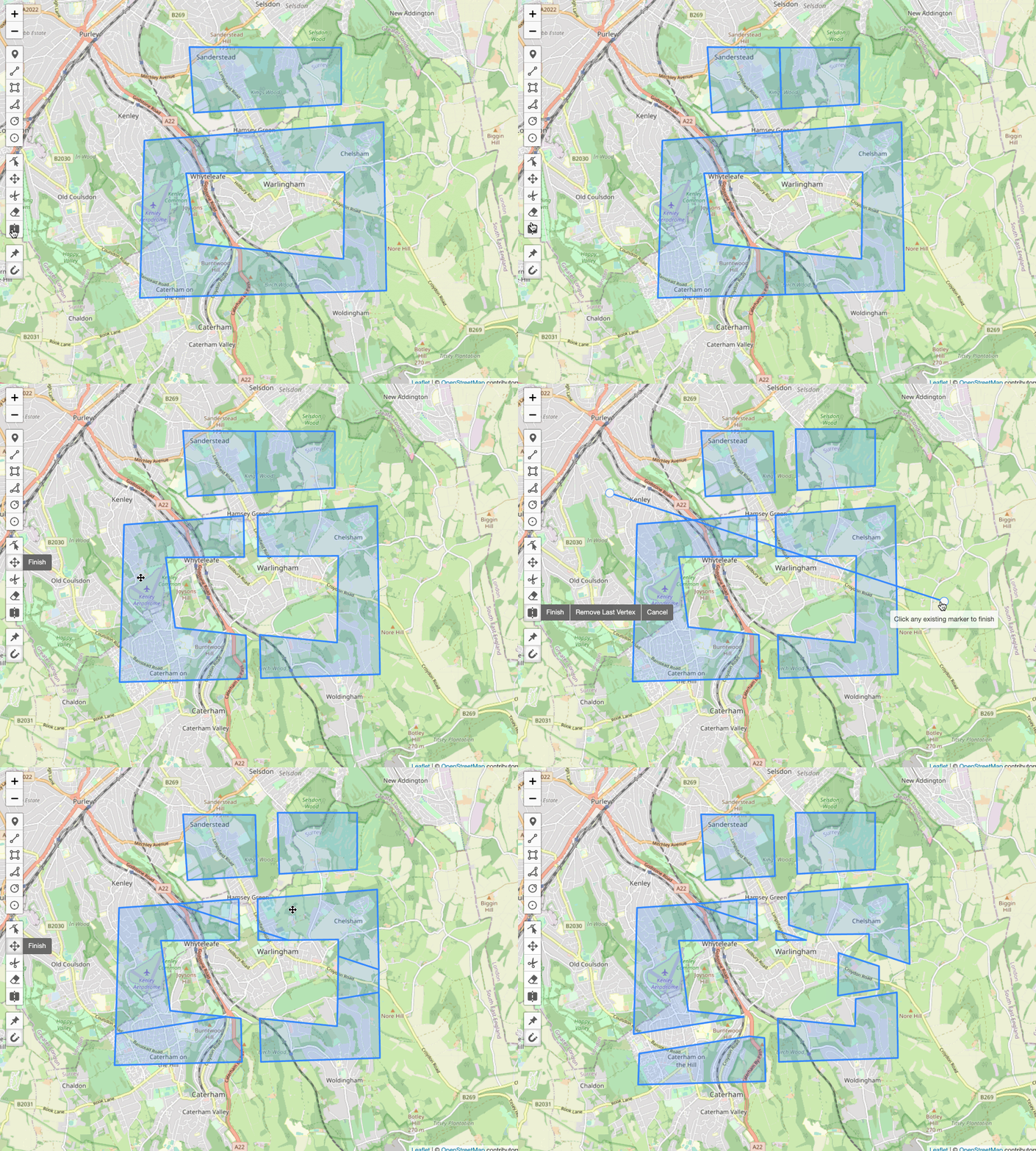
Enable drawing for the shape "Split" to draw a line that splits all underlying Polygons and Polylines.
Important: the splitted layer will be replaced, not updated. Listen to the `pm:split` event to update your layer references in your code. The `pm:split` event will provide you with the original layer and returns the resulting layer(s) that is/are added to the map as a Polygon / MultiPolygon or Polyline / MultiPolyline.
```js
// enable cutting mode
map.pm.enableGlobalSplitMode({
allowSelfIntersection: false,
});
```
Available options are the same as in [Draw Mode](#draw-mode) and in table below:
| Option | Default | Description |
| :-------------------- | :------ | :----------------------------------------------------------------------------------------------------------------------------------------------------------------------------- |
| splitOnlyMarkedLayers | `false` | If it is set to `false` layers can be excluded with the option `splitMark: false`. Set it to `true` to enable splitting only for the layers with the option `splitMark: true`. |
The following methods are available on `map.pm`:
| Method | Returns | Description |
| :------------------------------- | :-------- | :--------------------------------------------------------------------- |
| enableGlobalSplitMode(`options`) | - | Enable Split Mode. |
| disableGlobalSplitMode() | - | Disable Split Mode. |
| toggleGlobalSplitMode(`options`) | - | Toggle Split Mode. |
| globalSplitModeEnabled() | `Boolean` | Returns `true` if global Split Mode is enabled. `false` when disabled. |
The following events are available on a layer instance:
| Event | Params | Description | Output |
| :------- | :----- | :-------------------------------------------------------------------------------------------------- | :----------------------------------------------- |
| pm:split | `e` | Fired when the layer being split. Returns a LayerGroup containing all resulting layers in `layers`. | `shape`, `splitLayer`, `layers`, `originalLayer` |
The following events are available on a map instance:
| Event | Params | Description | Output |
| :------------------------ | :----- | :----------------------------------- | :----------------------------------------------- |
| pm:globalsplitmodetoggled | `e` | Fired when Split Mode is toggled. | `enabled`, `map` |
| pm:split | `e` | Fired when any layer is being split. | `shape`, `splitLayer`, `layers`, `originalLayer` |
### Scale Mode ⭐
You can enable Scale Mode for all layers on a map like this:
```js
map.pm.enableGlobalScaleMode();
```
With the option `centerScaling` the scale origin cen be the center of the layer or the opposite corner of the dragged marker. If `false` Alt-Key can be used.
The option `uniformScaling` the scales the width and the height with the same ratio. If `false` Shift-Key can be used.
The following methods are available on `map.pm`:
| Method | Returns | Description |
| :----------------------- | :-------- | :--------------------------------------------------------------------- |
| enableGlobalScaleMode() | - | Enables global Scale Mode. |
| disableGlobalScaleMode() | - | Disables global Scale Mode. |
| toggleGlobalScaleMode() | - | Toggles global Scale Mode. |
| globalScaleModeEnabled() | `Boolean` | Returns `true` if global Scale Mode is enabled. `false` when disabled. |
The following methods are available for layers under `layer.pm`:
| Method | Returns | Description |
| :-------------------- | :-------- | :---------------------------------------------------------------------------------------------------------------------------- |
| enableScale() | - | Enables Scale Mode on the layer. |
| disableScale() | - | Disables Scale Mode on the layer. |
| scaleEnabled() | `Boolean` | Returns if Scale Mode is enabled for the layer. |
| scaleLayer(`percent`) | - | Scale the layer by `x` percent. Also an Object with `{w: width, h: height}` can be passed. Scale up `> 0` , scale down `< 0`. |
The following events are available on a layer instance:
| Event | Params | Description | Output |
| :-------------- | :----- | :---------------------------------------- | :----------------------------------------------------- |
| pm:scaleenable | `e` | Fired when scale is enabled for a layer. | `layer`, `helpLayer` |
| pm:scaledisable | `e` | Fired when scale is disabled for a layer. | `layer` |
| pm:scalestart | `e` | Fired when scale starts on a layer. | `layer`, `helpLayer`, `originLatLngs`, `originLatLngs` |
| pm:scale | `e` | Fired when a layer is scaled. | `layer`, `helpLayer`, `oldLatLngs`, `newLatLngs` |
| pm:scaleend | `e` | Fired when scale ends on a layer. | `layer`, `helpLayer`, `originLatLngs`, `newLatLngs` |
The following events are available on a map instance:
| Event | Params | Description | Output |
| :------------------------ | :----- | :---------------------------------------- | :----------------------------------------------------- |
| pm:globalscalemodetoggled | `e` | Fired when Scale Mode is toggled. | `enabled`, `map` |
| pm:scaleenable | `e` | Fired when scale is enabled for a layer. | `layer`, `helpLayer` |
| pm:scaledisable | `e` | Fired when scale is disabled for a layer. | `layer` |
| pm:scalestart | `e` | Fired when scale starts on a layer. | `layer`, `helpLayer`, `originLatLngs`, `originLatLngs` |
| pm:scale | `e` | Fired when a layer is scaled. | `layer`, `helpLayer`, `oldLatLngs`, `newLatLngs` |
| pm:scaleend | `e` | Fired when scale ends on a layer. | `layer`, `helpLayer`, `originLatLngs`, `newLatLngs` |
### Text Layer

Additional to the default methods and options there are a few more possibilities for Text Layers:
#### Text Layer Drawing:
```js
map.pm.enableDraw('Text', { textOptions: { text: 'Geoman is fantastic! 🚀' } });
```
See the available options for `textOptions` in the table below.
| Option | Default | Description |
| :------------- | :------ | :------------------------------------------------------------ |
| text | `` | Predefined text. |
| focusAfterDraw | `true` | Directly after placing the marker, text editing is activated. |
| removeIfEmpty | `true` | The text layer is removed if no text is written. |
| className | `` | Custom CSS Classes. Separated by a space. |
#### Text Layer Editing:
The following methods are available on `layer.pm`:
| Method | Returns | Description |
| :-------------- | :------------ | :-------------------------------------------------------------------- |
| focus() | - | Activate text editing. Layer needs first to be enabled `.enable()`. |
| blur() | - | Deactivate text editing. Layer needs first to be enabled `.enable()`. |
| hasFocus() | `Boolean` | Is text editing active. |
| getElement() | `HTMLElement` | Returns the `




